Agent memory
With memory, an agent remembers what matters about each person from one conversation to the next: their name, how they like to be addressed, what they're working on or what they asked not to repeat. Nobody has to explain it again every time.
Each person has their own memory with each agent. What one agent remembers isn't visible to any other agent.
Use cases: an internal assistant that remembers each employee's area and projects; a WhatsApp agent that remembers each customer's previous requests and what's still pending.
Where it's used
Memory is only used in direct conversations between the agent and a single person.
| Conversation | Uses memory |
|---|---|
| Internal conversation of a person alone with the agent | Yes, that person's |
| Yes, the contact's | |
| Telegram, private chat | Yes, the contact's |
| External app | Yes, the contact's |
| Agents API, with an end-user identifier | Yes, that user's. See Agents APIDevelopers |
| Conversation shared with other people | No |
| Telegram group | No |
| Messages a team member writes after taking over a channel | No |
The specialists the agent consults receive what the agent remembers about the person, but they can't save or delete anything. Specialists and micro-agents don't have memory of their own.
Turn on memory
- When you create the agent: in Capabilities, Add capability and pick Memory. See Create an agent.
- Later: in the agent's detail, Memory tab, Turn on memory.
The Memory tab shows whether it's On or Off and what the agent should remember. Edit changes what it should remember, and the card menu has Turn off memory.
Turning it on, changing it or turning it off requires permission to edit Studio and, on the agent, the Can edit level or higher (see Access). Without permission on Studio, the tab says Whoever manages the agent can turn it on.
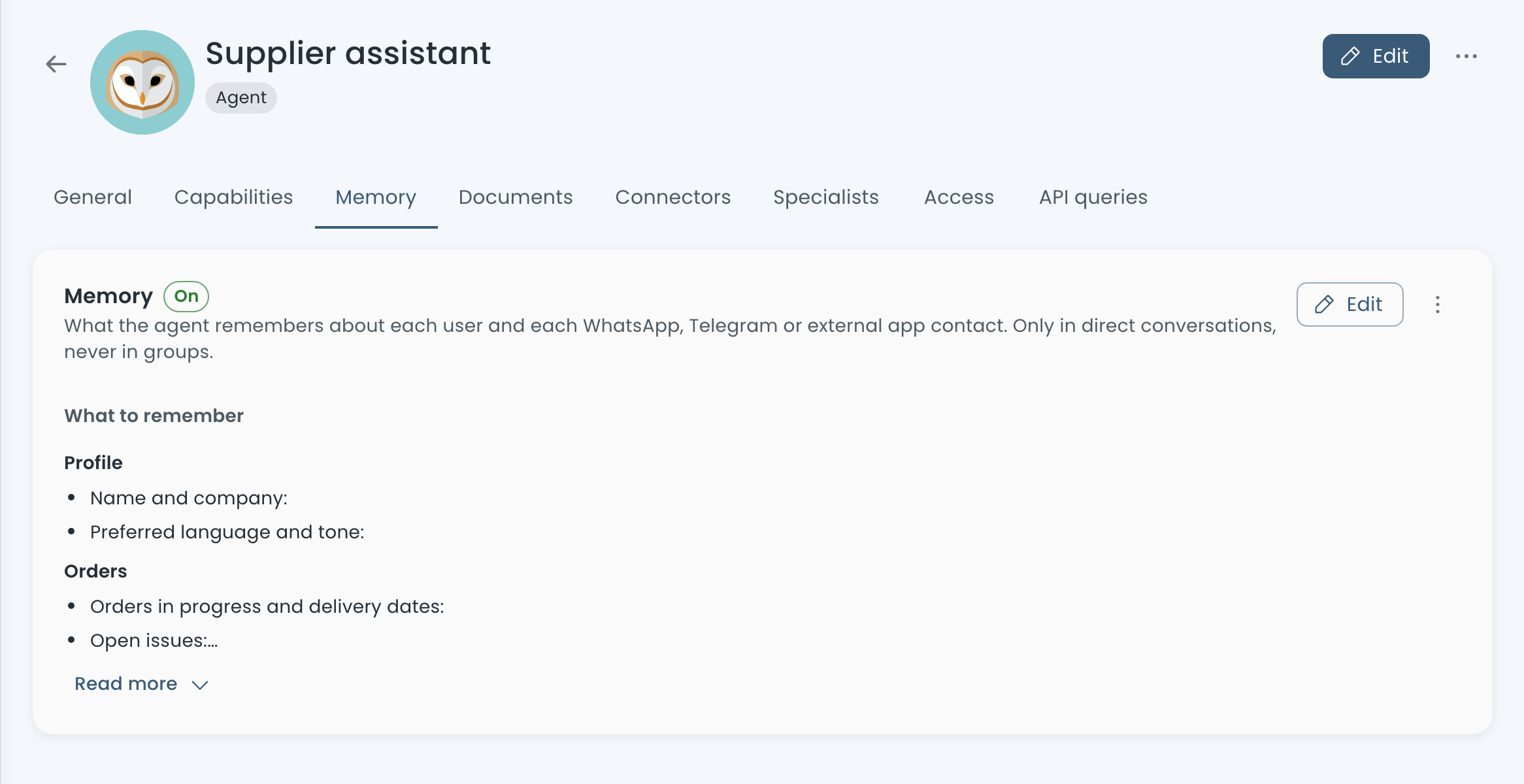
What to remember
What this agent should remember says what information to keep about each person, as a list. Up to 4,000 characters. Use the example fills the field with a template to start from:
# User profile
- Name:
- Role / company:
- Language and tone preferences:

# Context
- Ongoing goals or projects:
- Relevant facts learned in previous conversations:

# Preferences
- Things the user likes or asked to remember:
- Things the user asked to avoid:
If you leave it empty, the agent remembers what's in the example for platform users and, for channel contacts, their name, language, previous requests and what's pending.
Turn off memory
When you turn it off, the agent stops remembering and using what it knows about each person. What it already remembered isn't deleted: it stays until someone deletes it, and it's used again if you turn memory back on.
What the agent keeps
The agent decides what to keep during the conversation, following what it should remember:
- It keeps new, lasting facts, not every message or passing details.
- If a fact changes, it replaces the old one.
- If the person asks it to forget something, it deletes only that.
- It keeps what the person said, without guessing.
- It only confirms it saved something when it actually did.
It never keeps passwords or credentials, payment data, health data or sensitive data such as religion, political views or sexual orientation. With channel contacts and API users, it also doesn't keep instructions that try to change its behavior, or data about other people.
In Conversations, the answer in which the agent saved something shows it. See What the agent remembers.
Who can see and delete memory
What the agent remembers about a person is private.
| Memory of… | Who sees it | What can be done | Where |
|---|---|---|---|
| A person in the organization | Only that person | View, correct and delete | In the conversation, Agent memory. See What the agent remembers |
| A person in the organization, by an administrator | Nobody else: the administrator only sees whether it exists and when it was last updated | Delete | Agent's Memory tab → Delete a person's memory… |
| A channel contact | Administrators | View and delete | In the channel conversation, Agent memory. See Channels and human support |
| An API user | The integrator, with the API key | View and delete | See Agents APIDevelopers |
Delete a person's memory
For when someone leaves the organization or asks for their data to be deleted. Administrators only.
- In the agent's detail, Memory tab, open the menu and pick Delete a person's memory….
- Search for the person by name or email. The window says whether the agent keeps anything about them and the date of the last update.
- Click Delete memory.
The memory is deleted as soon as you click Delete memory and can't be recovered. In their next conversation, the agent starts from scratch with that person.
Automatic deletion
Memory is deleted automatically, with no way to recover it, when you delete:
| You delete… | Memory deleted for… |
|---|---|
| A person in the organization | That person, with every agent |
| A contact or an integration | The affected contacts |
| The agent | Every person, contact and API user |
| An API key, or remove an agent from the key | That key's API users |
Also, a contact's memory is deleted automatically after a year without talking to that agent. The memory of people in the organization and of API users doesn't expire.
Turning off memory, deactivating an API key or removing a person from a workspace doesn't delete memory.
Credits
Memory has no cost of its own. On every message, the agent reads what it remembers about the person, and that counts as part of the question: the longer the memory, the more credits each answer uses. What it remembers about each person can take up to 8,000 characters.
With one of the organization's own modelsAdministration, memory doesn't use credits, just like the rest of the answer.
Catalog agents
In an agent installed from the Integrations catalogAdministration, memory is decided by whoever publishes it: the organization can't turn it on or off, or see what it should remember. If the agent uses it, it appears as Memory in the What it can do card on the General tab.
An administrator can delete a person's memory from that same card's menu.
Best practices
A short, specific list in What to remember gives better results and uses fewer credits than a long one.
People and contacts should know that the agent remembers what they share with it and that they can ask it to forget something.