Micro-agents
A micro-agent does one specific task and returns the result with a fixed structure: for example, reading an invoice and returning the supplier, the date and the amount. It doesn't talk with anyone: the platform runs it when needed, for example when a document is uploaded to a folder or when an email arrives.
Each micro-agent has a type, which decides where it can be used. You choose the type when you create it, and you can't change it.
Micro-agent types
| Type | What it does | Where it's used |
|---|---|---|
| Document Extractor | Extracts text and data from images, PDFs and scanned documents | Smart Extract folders |
| Mail Reader | Reads Smart Inbox emails and saves data or a summary. See Mail Reader | Smart Inbox rules |
| Image Describer | Describes the images in PDFs (charts, photos, diagrams) so agents can understand them | PDF conversion of Knowledge Hub folders (see Folders and files) |
| Conversation Analyzer | Analyzes conversations to produce a summary, sentiment, category and suggested replies | Conversation analysis |
| Multimedia Processor | Analyzes YouTube videos and audio saved in multimedia folders | Multimedia folders |
| Search agent | Searches the documents in folders using the organization's criteria and terminology | Agents' search of folders and search profiles. See Search agent |
The platform uses the first conversation analyzer created in the organization. If there are several, only that one works.
Create a micro-agent
- In the Studio, on the Micro-agents tab, click New micro-agent.
- Configuration: micro-agent type, name, description, system instructions and model.
- Schema and instruction: the structure of the response and the execution instruction. The Image Describer and the Mail Reader with result Summary don't have this step: their output has no schema, and the execution instruction is written in step 1.
- Click Create.
Configuration
| Field | Description |
|---|---|
| Micro-agent type | Required. See the table above. It can't be changed later |
| Result | Only for the Mail Reader, and required: Structured data or Summary. It can't be changed later |
| Micro-agent name | Required, between 3 and 50 characters, not repeating the name of another agent |
| Description | Required, up to 400 characters |
| System instructions | Required, up to 50,000 characters. The micro-agent's role and the general rules |
| Model | Lightweight Google models suited to extraction are offered. The Mail Reader can use any available provider, including the organization's own models. The Image Describer needs a model that can read images |
| Temperature | From 0 to 1. Default: 0. For extracting data it's best to leave it at 0 |
Schema and instruction
First you choose Where does the structure come from?:
- Define my own: you describe it in the same form.
- Use a schema from the library: you choose a schema and a version from the Schema library. This is useful when several micro-agents, folders or apps share the same structure.
With your own structure:
| Field | Description |
|---|---|
| Response schema | The properties it must return, with their name, type, format, description and whether they're required. You edit it in Visual or Code mode. Up to 4 levels of nesting |
| Response Example | Required. A real example of what it must return. Generate from schema suggests one |
And in both cases:
| Field | Description |
|---|---|
| Execution instruction | Required, up to 20,000 characters. The specific command that runs on each document or email |
Generate with AI suggests the schema based on the instructions, and each text field has its own AI improve button.
Example of an execution instruction for an invoice extractor:
Read the invoice and return the supplier, their tax ID, the issue date, the invoice number and the total amount including taxes. If a piece of data doesn't appear in the document, return it empty; don't infer it.
Mail Reader
It reads the emails a Smart Inbox rule captures and saves the result to the rule's folder. The Result is chosen when it is created and stays fixed:
| Result | What it saves | Schema step |
|---|---|---|
| Structured data | The fields of a schema, always in the same format | Yes |
| Summary | A text document with what matters in the email | No |
A folder holds a single kind of result, and a folder with a schema only accepts Structured data. See AI analysis.
Search agent
A Search agent replaces the platform's default search agent in the folders it's assigned to. Use it so that searching the documents takes the organization's vocabulary into account.
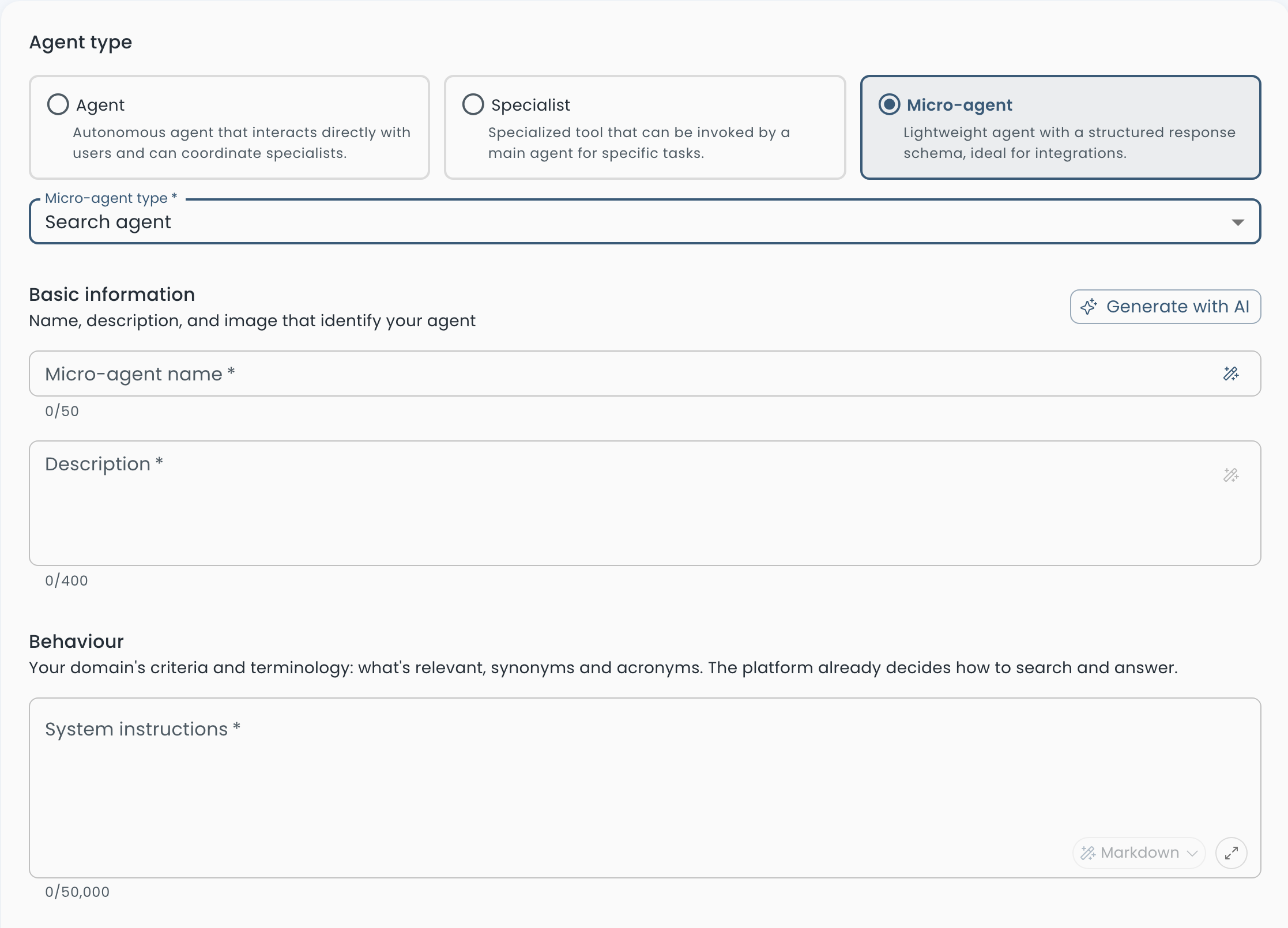
- It has no Response schema or Execution instruction: only System instructions.
- In the instructions, write only the domain's criteria and terminology: what is relevant, synonyms and acronyms. The platform already decides how to search and how to answer, so you don't need to explain that.
- It's assigned to folders, not to agents: in a folder's Agents' search or in a profile, field Search agent. See Agents' search.
- Only active search agents can be chosen.
Example of system instructions:
In contracts, "addendum" and "amendment" mean the same thing; always prioritize the version currently in force. "WO" is a work order and "TSS" is the technical support service.
A micro-agent's detail
| Tab | Contents |
|---|---|
| General | Type, description, origin, model, temperature, dates, owner, system instructions and execution instruction |
| Response schema | The structure it returns, its own or from the library (with its version) |
In the list, the type shows under the name, and micro-agents installed by an app from the catalog show From application and the app's name under Origin.
Delete
If folders use the micro-agent, the platform warns you and asks you to type its name to confirm. An Image Describer in use by any folder can't be deleted: first you have to change the describer of those folders. The same goes for a Search agent used by folders or profiles: the platform tells you how many, and you have to assign them another search agent first.
Best practices
- One micro-agent per document type: one for invoices, another for delivery notes.
- Few properties, only the ones you'll use, with clear descriptions.
- A real response example that matches the schema.
- Say in the instruction what to do when a piece of data is missing, so it doesn't make it up.
- Test with a few real documents in an extraction folder before using it at scale.