Integrations and channels
An integration connects a channel to ConsulPoint: a WhatsApp number, a Telegram bot, an email account, an external app or Google Calendar. Conversations from the channels arrive in ConversationsUser guide, and email arrives in the Smart InboxUser guide.
The screen
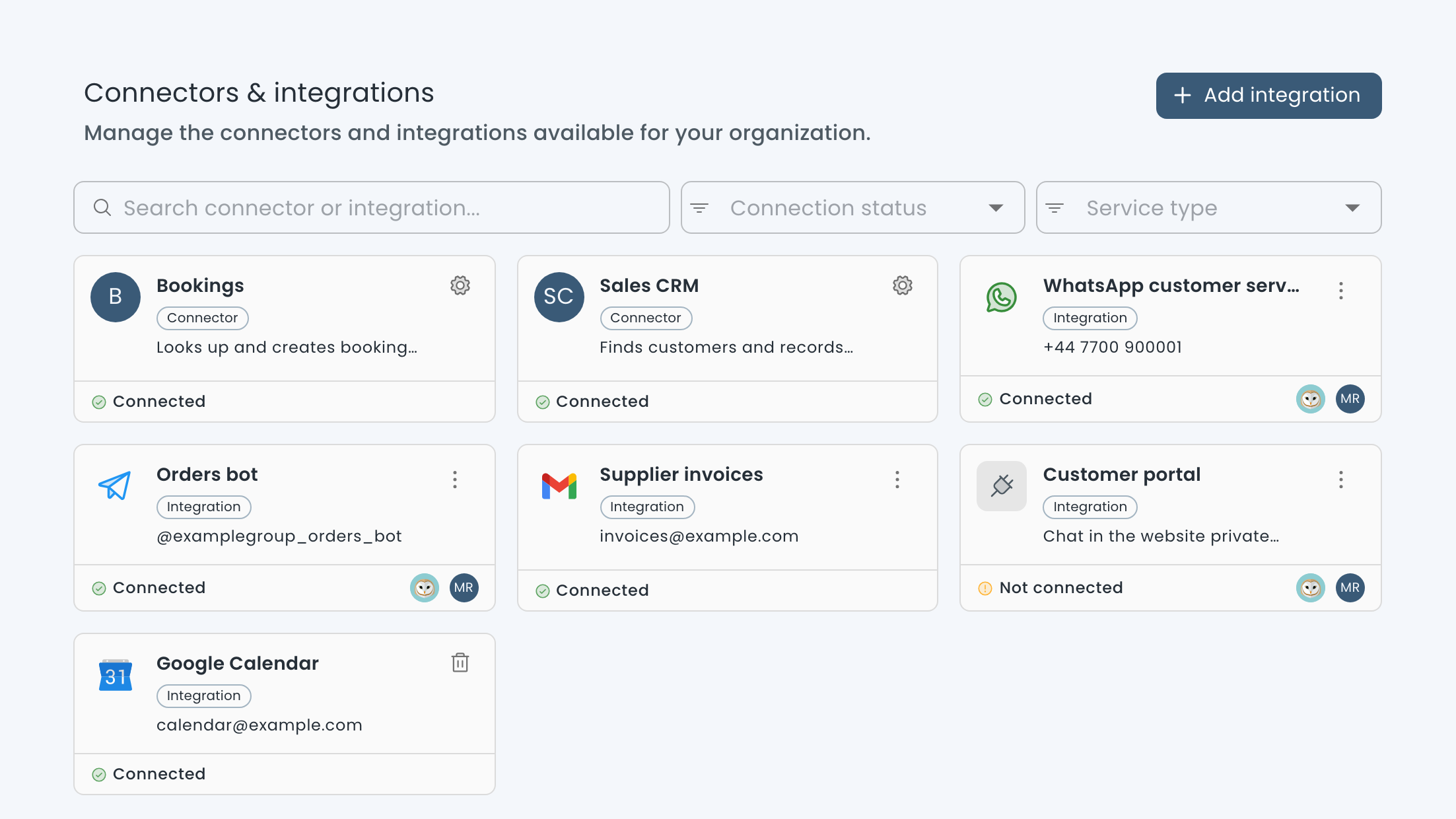
In Settings → Connectors, the Connectors & integrations screen shows a card for each integration, labeled Integration, and for each connector, labeled Connector. You can search and filter by Connection status and by Service type.
| Status | Meaning |
|---|---|
| Connected | The channel is working |
| Not connected | The connection isn't complete yet, for example the email account hasn't been authorized |
| Expired — reconnect | WhatsApp only: the authorization expired and the number has to be connected again. Until then, the channel doesn't work. See When the connection expires |
Channels
You add them with Add integration:
| Channel | What it's for | Where it arrives | How to connect it |
|---|---|---|---|
| Handling a WhatsApp Business number with an agent and with people from the team | Conversations | ||
| Telegram | Handling a Telegram bot | Conversations | Telegram |
| Gmail and Microsoft Outlook (with account authorization) or any IMAP email | Smart Inbox | Connect an email accountUser guide | |
| External app | Letting your own system send and receive messages through an API | Conversations | External app |
| Google Calendar | Letting agents check availability and book appointments | — | Google Calendar |
Actions
Each card has its own actions depending on the channel:
| Action | Channels | What it does |
|---|---|---|
| Edit | All | Changes the name, the description and the channel details |
| Manage team | WhatsApp, Telegram, external app | Assigns the owner, the agent and the team that handle the conversations |
| Connect account / Reconnect account | Authorizes (or re-authorizes) the account | |
| Regenerate API key / Regenerate signing secret | External app | Creates new credentials; the previous ones stop working |
| Connect Google Calendar / Disconnect | Google Calendar | After disconnecting, agents can no longer check availability or book appointments |
| Delete | All | Deletes the integration. It can't be undone |
Details of each integration
The details requested depend on the channel:
| Channel | Details | Owner and agent |
|---|---|---|
| Through Meta (guided) or manual. Manual: WhatsApp number, Your WhatsApp Business account ID, Your number ID and Access key. Name and description, optional | In Who will handle this number?: Person in charge and AI agent. Optional, but without an agent the channel doesn't reply | |
| Telegram | Integration name, Description (optional) and Bot token | Owner and AI agent, required |
| Gmail and Microsoft | Integration name, Description (optional) and Visibility: Private or Global. The account is authorized with the provider | Not assigned |
| IMAP | Integration name, Description (optional), Email provider, Email address, Password, IMAP server, Port and Secure connection | Not assigned |
| External app | Integration name, Description (optional), Time without activity before starting a new conversation (minutes) (30 by default) and Require partner signature. Optionally, in Configure delivery: Reply delivery URL and Delivery API Key | In the Team step: Owner, AI agent and team or people. Optional |
The name can be up to 50 characters long and the description, if filled in, between 10 and 255.
To change the owner, the agent or the team later, use Manage team on the integration's card.
Wait timing
In WhatsApp, Telegram and external apps, Edit includes Wait timing, which applies when a conversation is waiting for a person from the team (see Channels and human supportUser guide):
| Field | Meaning |
|---|---|
| Reminder (minutes) | How often the contact is reminded they're still waiting. By default, every 10 minutes (from 1 to 1,440) |
| Max wait (minutes) | How long the contact can wait (from 1 to 10,080). Empty means automatic: 30 minutes in WhatsApp and Telegram; in external apps, it depends on the channel |
Human support
Channel conversations appear in Conversations. There, a person can Take control of a conversation or handle the ones showing Needs attention, and the agent stops replying in the meantime. See Channels and human supportUser guide.