Conversations
Conversations is where you talk to your organization's agents and where you handle the conversations that come in through WhatsApp, Telegram or other connected apps. It is also the place to test an agent before opening it to more people or connecting it to a channel.
This section requires no programming knowledge.
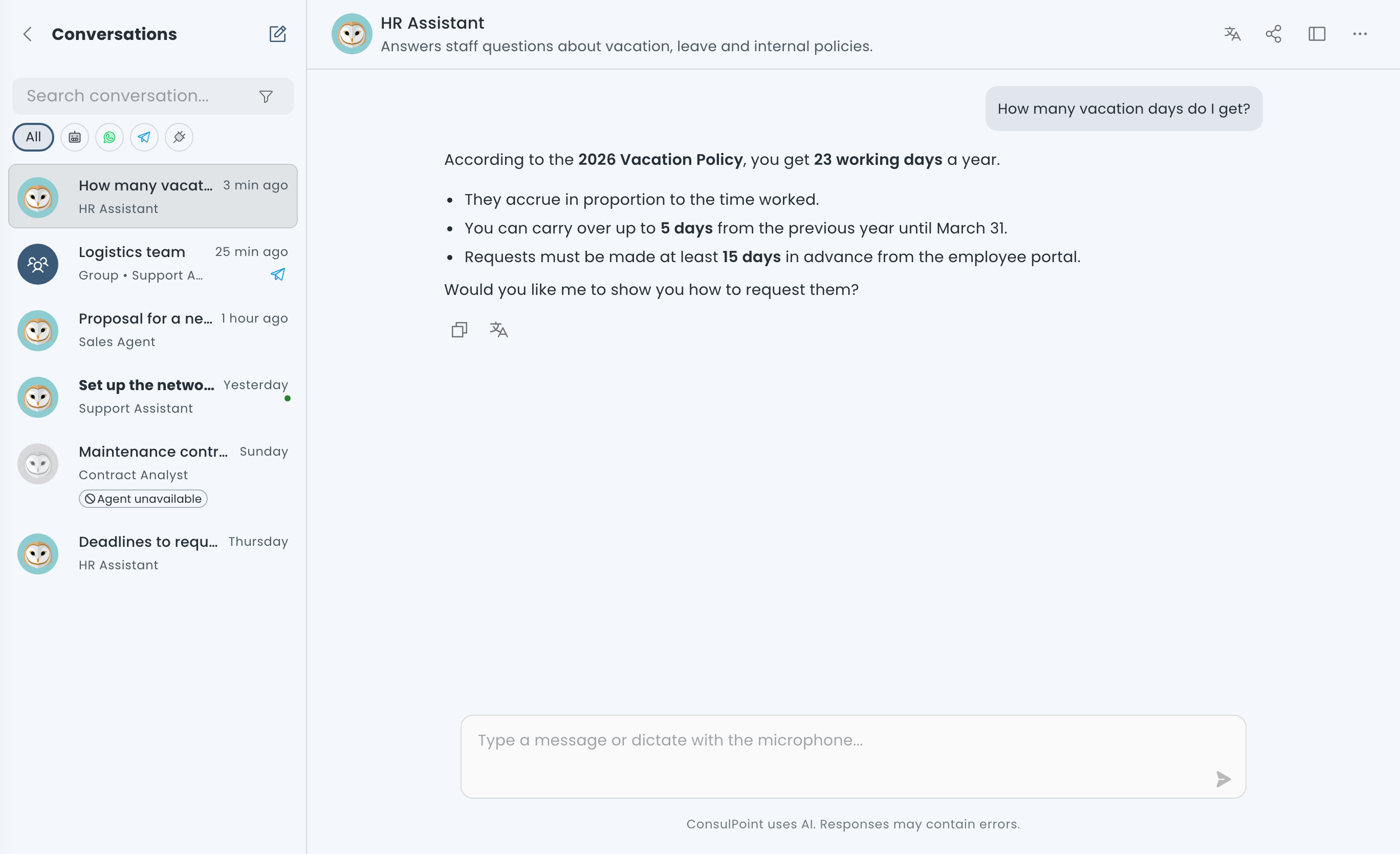
The screen
| Area | Content |
|---|---|
| Conversation list (left) | Search box, agent filter, tabs by channel and the New conversation button |
| Conversation (center) | The messages, the message box and the header with the actions |
| Side panel (right, optional) | A second conversation or an integrated app |
Tabs by channel
| Tab | Conversations |
|---|---|
| All | All of the below |
| Internal | Those started inside the platform |
| Those that come in through a connected WhatsApp number | |
| Telegram | Those that come in through a connected Telegram bot |
| Other integrations | Those that come in from external apps connected through the API |
The tabs only appear if the organization's subscription includes integrations.
Searching and filtering
- Search conversation... searches by title.
- The funnel opens Filter by agent: clicking an agent filters the list, and Remove filter shows it in full again. The chosen agent stays as a chip in the search box, which you remove with the ✕.
- If nothing matches, the list says so and offers Clear filters.
Each conversation in the list
It shows the agent or the contact, the date of the last message and, when relevant:
| Mark | Meaning |
|---|---|
| Unread dot | There are unread messages |
| Needs attention, You're handling this, Handled by… | The human support status |
| Agent unavailable | The agent is no longer available: you can read the conversation, but not continue it. See Talking to an agent |
| Group | It's a Telegram group. The title is the group's name |
Which conversations each person sees
- Their own: the ones they started.
- The ones shared with them: see Sharing and collaborating.
- The ones from channels they take part in: conversations from a WhatsApp or Telegram are seen by the owner and the team of that integration. See Channels and human support.
Nobody else, not even administrators, sees another person's conversations. Inside a workspaceAdministration you only see that workspace's conversations.
Where to start
| I want to… | Page |
|---|---|
| Talk to an agent, attach files or use web search | Talking to an agent |
| See where the agent got its answer from | Talking to an agent |
| Test an agent before publishing it | Talking to an agent |
| Share a conversation or open two at once | Sharing and collaborating |
| Handle WhatsApp or Telegram customers, or take control | Channels and human support |
| Solve a problem | Common issues |